
原标题:"思科跨路由器的单臂路由如何解决"相关路由器设置经验分享。 - 来源:WiFi之家网 思科拥有丰富的行业经验、先进的技术,路由器功能也在世界遥遥领先,那么你知道思科跨"
原标题:"思科跨路由器的单臂路由如何解决"相关路由器设置经验分享。 - 来源:【WiFi之家网】

思科拥有丰富的行业经验、先进的技术,路由器功能也在世界遥遥领先,那么你知道思科跨路由器的单臂路由如何解决吗?下面是【WiFi之家网】整理的一些关于思科跨路由器的单臂路由如何解决的相关资料,供你参考。
思科跨路由器的单臂路由解决的方法
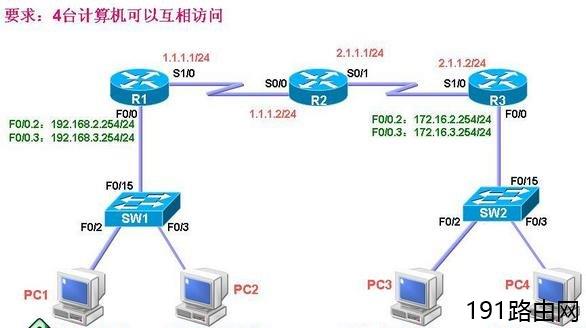
R1配置:
R1#conf t
R1(config)#int f0/0
R1(config-if)#no shutdown
R1(config-if)#int f0/0.2
R1(config-subif)#encapsulation dot1q 2
R1(config-subif)#ip address 192.168.2.254 255.255.255.0
R1(config-subif)#no shutdown
R1(config-subif)#exit
R1(config)#int f0/0.3
R1(config-subif)#encapsulation dot1q 3
R1(config-subif)#ip address 192.168.3.254 255.255.255.0
R1(config-subif)#no shutdown
R1(config-subif)#exit
R1(config)#int s1/0
R1(config-if)#ip address 1.1.1.1 255.255.255.0
R1(config-if)#no shutdown
R1(config-if)#end
R1#conf t
R1(config)#router ospf 1
R1(config-router)#network 192.168.2.0 0.0.0.255 area 0
R1(config-router)#network 192.168.3.0 0.0.0.255 are 0
R1(config-router)#network 1.1.1.0 0.0.0.255 area 0
R1(config-router)#end
R2配置:
R2#conf t
R2(config)#int s0/0
R2(config-if)#ip address 1.1.1.2 255.255.255.0
R2(config-if)#no shutdown
R2(config-if)#clock rate 64000
R2(config-if)#exit
R2(config)#int s0/1
R2(config-if)#ip address 2.1.1.1 255.255.255.0
R2(config-if)#no shutdown
R2(config-if)#clock rate 64000
R2(config-if)#end
R2#conf t
R2(config)#router ospf 2
R2(config-router)#network 2.1.1.0 0.0.0.255 area 0
R2(config-router)#network 1.1.1.0 0.0.0.255 area 0
R2(config-router)#end
R3配置:
R3#conf t
R3(config)#int s1/0
R3(config-if)#ip address 2.1.1.2 255.255.255.0
R3(config-if)#no shutdown
R3(config)#int f0/0
R3(config-if)#no shutdown
R3(config-if)#int f0/0.2
R3(config-subif)#encapsulation dot1q 2
R3(config-subif)#ip address 172.16.2.254 255.255.255.0
R3(config-subif)#no shutdown
R3(config-subif)#exit
R3(config)#int f0/0.3
R3(config-subif)#encapsulation dot1q 3
R3(config-subif)#ip address 172.16.3.254 255.255.255.0
R3(config-subif)#no shutdown
R3(config-subif)#end
R3(config)#router ospf 3
R3(config-router)#network 172.16.2.0 0.0.0.255 area 0
R3(config-router)#network 172.16.3.0 0.0.0.255 area 0
R3(config-router)#network 2.1.1.0 0.0.0.255 area 0
R3(config-router)#end
查看路由表:
R1#show ip route
Gateway of last resort is not set
1.0.0.0/24 is subnetted, 1 subnets
C 1.1.1.0 is directly connected, Serial1/0
2.0.0.0/24 is subnetted, 1 subnets
O 2.1.1.0 [110/128] via 1.1.1.2, 00:03:37, Serial1/0
172.16.0.0/24 is subnetted, 2 subnets
O 172.16.2.0 [110/129] via 1.1.1.2, 00:03:37, Serial1/0
O 172.16.3.0 [110/129] via 1.1.1.2, 00:03:37, Serial1/0
C 192.168.2.0/24 is directly connected, FastEthernet0/0.2
C 192.168.3.0/24 is directly connected, FastEthernet0/0.3
R2#show ip route
Gateway of last resort is not set
1.0.0.0/24 is subnetted, 1 subnets
C 1.1.1.0 is directly connected, Serial0/0
2.0.0.0/24 is subnetted, 1 subnets
C 2.1.1.0 is directly connected, Serial0/1
172.16.0.0/24 is subnetted, 2 subnets
O 172.16.2.0 [110/65] via 2.1.1.2, 00:03:37, Serial0/1
O 172.16.3.0 [110/65] via 2.1.1.2, 00:03:37, Serial0/1
O 192.168.2.0/24 [110/65] via 1.1.1.1, 00:03:37, Serial0/0
O 192.168.3.0/24 [110/65] via 1.1.1.1, 00:03:37, Serial0/0
R3#show ip route
Gateway of last resort is not set
1.0.0.0/24 is subnetted, 1 subnets
O 1.1.1.0 [110/128] via 2.1.1.1, 00:03:43, Serial1/0
2.0.0.0/24 is subnetted, 1 subnets
C 2.1.1.0 is directly connected, Serial1/0
172.16.0.0/24 is subnetted, 2 subnets
C 172.16.2.0 is directly connected, FastEthernet0/0.2
C 172.16.3.0 is directly connected, FastEthernet0/0.3
O 192.168.2.0/24 [110/129] via 2.1.1.1, 00:03:43, Serial1/0
O 192.168.3.0/24 [110/129] via 2.1.1.1, 00:03:43, Serial1/0
SW1配置:
SW1#vlan database
SW1(vlan)#vlan 2
SW1(vlan)#vlan 3
SW1(vlan)#exit
SW1#conf t
SW1(config)#int f0/15
SW1(config-if)#switchport mode trunk
SW1(config-if)#switchport trunk encapsulation dot1q
SW1(config-if)#exit
SW1(config)#int f0/2
SW1(config-if)#switchport mode access
SW1(config-if)#switchport access vlan 2
SW1(config-if)#exit
SW1(config)#int f0/3
SW1(config-if)#switchport mode access
SW1(config-if)#switchport access vlan 3
SW1(config-if)#end
SW2配置:
SW2#vlan database
SW2(vlan)#vlan 2
SW2(vlan)#vlan 3
SW2(vlan)#exit
SW2#conf t
SW2(config)#int f0/15
SW2(config-if)#switchport mode trunk
SW2(config-if)#switchport trunk encapsulation dot1q
SW2(config-if)#exit
SW2(config)#int f0/2
SW2(config-if)#switchport access vlan 2
SW2(config-if)#exit
SW2(config)#int f0/3
SW2(config-if)#switchport mode access
SW2(config-if)#switchport access vlan 3
SW2(config-if)#end
验证:
PC1:
PC1#ping 192.168.3.3
Type escape sequence to abort.
Sending 5, 100-byte ICMP Echos to 192.168.3.3, timeout is 2 seconds:
!!!!!
Success rate is 100 percent (5/5), round-trip min/avg/max = 188/246/300 ms
PC1#ping 172.16.2.2
Type escape sequence to abort.
Sending 5, 100-byte ICMP Echos to 172.16.2.2, timeout is 2 seconds:
!!!!!
Success rate is 100 percent (5/5), round-trip min/avg/max = 408/487/528 ms
PC1#ping 172.16.3.3
Type escape sequence to abort.
Sending 5, 100-byte ICMP Echos to 172.16.3.3, timeout is 2 seconds:
!!!!!
Success rate is 100 percent (5/5), round-trip min/avg/max = 384/441/492 ms
PC3:
PC3#ping 172.16.3.3
Type escape sequence to abort.
Sending 5, 100-byte ICMP Echos to 172.16.3.3, timeout is 2 seconds:
!!!!!
Success rate is 100 percent (5/5), round-trip min/avg/max = 168/258/348 ms
PC3#ping 192.168.2.2
Type escape sequence to abort.
Sending 5, 100-byte ICMP Echos to 192.168.2.2, timeout is 2 seconds:
!!!!!
Success rate is 100 percent (5/5), round-trip min/avg/max = 348/400/452 ms
PC3#ping 192.168.3.3
Type escape sequence to abort.
Sending 5, 100-byte ICMP Echos to 192.168.3.3, timeout is 2 seconds:
!!!!!
Success rate is 100 percent (5/5), round-trip min/avg/max = 312/396/516 ms

评论